Understanding Catch-All Rules in vDefend Firewalls

A Conversation About Different Types of Catch-All Rules While Implementing vDefend Distributed Firewall

CuriousTechie: Hello IT Guy! I’m starting a project to implement micro-segmentation using vDefend Distributed Firewall (DFW) for applications running in my SDDC environment. I’ve read that I need to implement Catch-All rules to analyze traffic. Can you help me understand what these rules actually mean and how they should be built?

ITGuy: Let’s start with the basic. Firewalls are generally implemented using two major approaches:

  1. Allow List – You explicitly create ALLOW rules for known, required (good) traffic.
  2. Block List – You explicitly create DROP rules for known, unwanted (bad) traffic.

When you micro-segment an application, you typically need to build ALLOW rules for all required (known) traffic for the application to function properly. At the end of these ALLOW rules, you usually place a DROP rule to block all unwanted or unknown traffic.

However, In brownfield environments, teams often lack complete visibility into all application dependencies. Enforcing a default DROP rule prematurely, without sufficient traffic analysis, can therefore result in unintended application outages.

To address this challenge, a Catch-All rule is implemented to monitor and log traffic that does not match any existing ALLOW rules, enabling teams to identify missing dependencies before enforcing restrictive security controls.

In simple terms, a Catch-All rule is a temporary monitoring rule placed at the bottom of an application-specific Distributed Firewall policy to observe traffic that is not yet explicitly allowed. This rule is typically configured in ALLOW mode with logging enabled during the discovery phase, prior to enforcing a strict default DROP posture.

CuriousTechie: How does the Catch-All rule help monitor traffic? What tools can be used for this analysis?

ITGuy: When traffic hits the Catch-All rule, it indicates that no explicit ALLOW rule has yet been defined for that specific flow. If that traffic is required for the application, a corresponding ALLOW rule must be created above the Catch-All rule.

At a high level, there are three ways to monitor traffic hitting Catch-All rules:

  1. Use Security Intelligence(Preferred) – Security Intelligence is a feature running on the Security Services Platform (SSP) that provides visibility into traffic flows across the environment and generates data-driven Distributed Firewall rule recommendations, while maintaining centralized policy governance.
  2. Use VCF Operations for Networks (formerly vRNI, also known as AON) – This tool can be used to analyze flows passing through a particular DFW rule ( the Catch-All ). Required rules can then be created manually or using other preferred method.
  3. Use VCF Operations for Logs (formerly vRLI, also known as AOL)– VCF Operations for Logs is best suited for verification and deep-dive troubleshooting rather than initial dependency analysis, as packet-level inspection can be time-intensive and operationally complex.

CuriousTechie: Should I create two Catch-All rules for Ingress and Egress, or use a single rule and just use the Applied To field?

ITGuy: Excellent question! Let’s look at the differences between these two approaches.

Option 1: Use separate rules for ingress and Egress

This approach can be useful when you are manually analyzing flows, as having two separate rules allows you to focus on ingress and egress traffic independently. It can provide some operational convenience.

However, there are a few challenges with this approach:

  • The Catch-In rule does not capture multicast or broadcast traffic targeting the vNIC, which can result in incomplete visibility during the discovery phase.
  • When using Security Intelligence, traffic hitting ingress and egress Catch-All rules is classified as Protected, which means it is treated as intentionally permitted and is therefore excluded from recommendation analysis.

Option 2: Use a Single Catch-All Rule

This is the recommended and default approach for modern implementations using Security Intelligence.

This method overcomes the limitations of the previous approach by capturing all traffic hitting the vNIC of virtual machines that are members of the group specified in the Applied To field.

Traffic flowing through a single Catch-All rule is classified as Unprotected, making it eligible for Security Intelligence analysis and rule recommendation generation.

Catch-All rules should be time-bound and periodically reviewed, with the objective of replacing them with explicit ALLOW rules and ultimately enforcing a default DENY posture in alignment with zero-trust principles.

CuriousTechie: This is great information! I’ll plan to use the single Catch-All rule approach.. But I am very curious to understand:

  • Why is multicast and broadcast traffic not captured by the Catch-In rule in the first scenario?
  • What exactly do Protected and Unprotected traffic mean in Security Intelligence?

ITGuy: Great questions! Let’s dive into these topics the next time we talk!
Prepare for VMware vDefend Certification in 1 Week

A Conversation About Preparing for the VMware vDefend Security Certification (6V0-21.25)

CuriousTechie: Hello IT Guy! I need to prepare for and attempt for the VMware vDefend Security certification within a week’s time. Is that doable? What’s your opinion?

ITGuy: The answer is subjective. It depends on your current skill set, how much time you have spent working on NSX vDefend and how many hours you can commit to the lab over the next 7 days.

CuriousTechie: I have been a NSX admin for a few years now, and I work with the Distributed Firewall (DFW) daily. Does that put me in a good spot to crack the exam in one week?

ITGuy: That’s a great start! Let’s look at the exam blueprint. The VMware vDefend Security exam (6V0-21.25) is currently based on VCF 5.x (NSX 4.x). Here are a few pointers:

  • This is an Administrator-level exam so you can expect low level questions on configuration options for a feature
  • It tests core NSX basics, the Security Services Platform (SSP), and the Advanced Threat Prevention (ATP) suite.
Continue reading “Prepare for VMware vDefend Certification in 1 Week”

Secure Your VMware Environment: Block SMB v1 with vDefend

A conversation about SMB protocol and how vDefend Firewall can help to Block legacy SMB protocols in a VCF or vSphere environment.

CuriousTechie: Hello IT Guy! I am trying to improve the security posture of my VMware SDDC Environment and block SMB version 1. Can I do it using vDefend firewall?

ITGuy: Absolutely! You can do it for the whole environment or very selectively for specific workloads. You can have the full flexibility and control over the traffic pattern using vDefend Firewall.

CuriousTechie: Alright but I do have a challenge. I have few legacy systems in the environment. They still use UDP port 137, 189, and TCP port 139 for NetBIOS services. Thus blocking these ports is not really an options for me.

Continue reading “Secure Your VMware Environment: Block SMB v1 with vDefend”

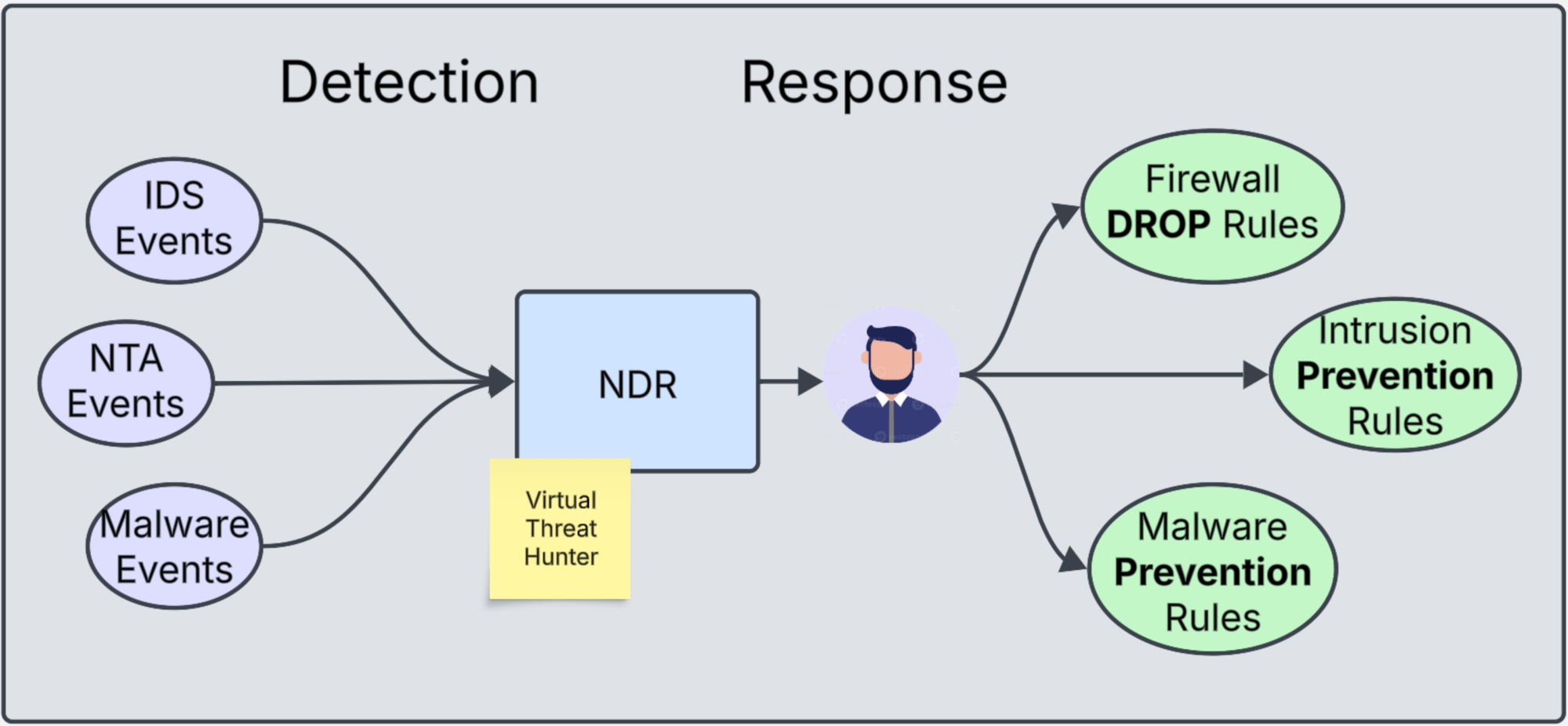
The Role of vDefend NDR in Protecting VMware SDDC Environments

A conversation about understanding the use and importance of vDefend Network Detection and Response.

CuriousTechie: Hello IT Guy! In the previous discussion here we talk about SSP(Security Services Platform) and the features we can activate/run on SSP. Can you help me understand how does the feature Network Detection & Response(NDR) actually detects and responds to threats?

ITGuy: That’s a very interesting feature!!!! When you activate NDR it does NOT actually Detects and Responds to any threats!!!

CuriousTechie: What???? Really???? Then what does it do????

Continue reading “The Role of vDefend NDR in Protecting VMware SDDC Environments”

Understanding VMware’s Security Services Platform (SSP)

A brief discussion about understanding vDefend Security Services Platform

CuriousTechie: Hello IT Guy! I have been hearing about a new product in VMware’s portfolio called SSP – Security Services Platform. Can you help me understand what is this product?

ITGuy: Sure! Have you worked with NAPP ( NSX Application Platform) ? And how was your experience working with NAPP?

CuriousTechie: Yes! I have deployed and used NAPP after having a conversation with you here. To be honest, it was fun but little tough to deploy. It required some Kubernetes knowledge and had a lot of dependencies. Also an air gap deployment was very challenging.

ITGuy: SSP is the successor of NAPP but its exponentially easy to deploy without any major dependency. vDefend Security Services Platform represents a next-generation solution for visualizing and managing vDefend Security within VMware Cloud Foundation (VCF). It is designed to deliver a high-performance, scalable platform that efficiently operates various vDefend security services.

Continue reading “Understanding VMware’s Security Services Platform (SSP)”

Understanding vDefend Firewall Directionality

A brief discussion about understanding directionality in vDefend Firewalls

CuriousTechie: Hello IT Guy! I have been playing around different options of implementing vDefend Distributed Firewalls. I see an option of Direction in the firewall rules (In-Out). Can you help me understand how does that work?

ITGuy: Sure! The direction in the rule is always with context to the VM(workload).

Rule Direction = In = Traffic will be allowed/disallowed to enter the VM = Ingress to the VM

Rule Direction = Out = Traffic will be allowed/disallowed to exit the VM = Egress from the VM

CuriousTechie: Then why do we have the default as In-Out?

Continue reading “Understanding vDefend Firewall Directionality”

Understanding ALGs with vDefend Distributed Firewall

A brief discussion about Application Level Gateways and their use with vDefend Distributed Firewall

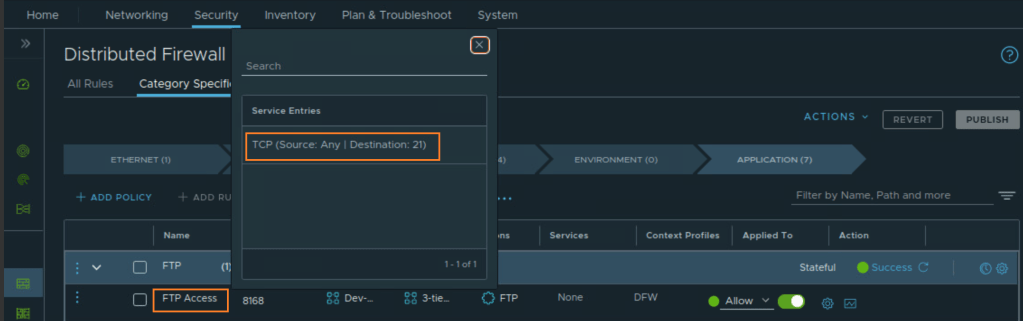
CuriousTechie: Hello IT Guy! I am implementing Distributed Firewall in my SDDC environment. I have created a DFW rule to allow FTP access on TCP port 21, users are able to login to FTP server but not able to move files around. Can you help me to troubleshoot this issue?

ITGuy: Sure! Can you show me the DFW rule you have created for the FTP access?

CuriousTechie: Here is the rule

ITGuy: The problem is evident! You are using a normal TCP port instead of an ALG.

Continue reading “Understanding ALGs with vDefend Distributed Firewall”

Monitoring vDefend Distributed Firewall Operations

In this short conversation we will talk about monitoring the operations of a vDefend Distributed Firewall implementation.

CuriousTechie: Hello IT Guy! We had a conversation about implementing micro-segmentation here. I began implementing micro-segmentation in our VMware Software Defined Data Center(SDDC) environment using vDefend Distributed Firewall. Multiple engineers work simultaneously to implement the rules and secure their respective applications. I am looking for a way to audit these operations to detect any unintended rule creation, modification or deletion. Can you help me with some pointers to monitor these activities?

ITGuy: In my honest opinion, logs are your best friend when you want to monitor DFW operations. You can very well customize what you want to monitor and how? You can choose dashboards for certain activities and alerts for critical activities.

CuriousTechie: What tools will I need to build these dashboards and alerts?

ITGuy: Some very common ones are vRealize LogInsight aka Aria Operation for Logs here, Splunk here etc. You can use any other log aggregator of your choice to do this.

Continue reading “Monitoring vDefend Distributed Firewall Operations”

Enhancing SDDC Security with vDefend NTA Insights

A discussion on vDefend NTA( Network Traffic Analysis) and how it can improve the SDDC security posture.

CuriousTechie: In our last conversation here, we briefly touched upon NTA (Network Traffic Analysis). I am trying to explore more about it. However, I do not see the term NTA anywhere in NSX or NAPP UI. Can you help me understand, how can I get started with NTA?

ITGuy: I absolutely understand your confusion here. NTA is not a feature that you can enable directly on the NAPP UI. NTA actually piggy backs on top of NSX Intelligence and you can enable NTA detectors once you enable Intelligence.

Network Traffic Analysis (NTA) helps you(security admin) to detect anomalous activity and malicious behavior in the environment. NTA examines network traffic and traffic flow records by using machine learning (ML) algorithms and advanced statistical techniques. NTA identifies abnormal activity, whether it be by hosts, in protocols, or inside the network traffic itself.

CuriousTechie: Where can I find it in NSX UI?

ITGuy: In NSX UI, you will find these NTA detectors under Security-> Suspicious Traffic -> Detector Definitions. As of today there are 14 detectors which you can enable.

CuriousTechie: Are there any pre-requisites to enable and use these detectors?

ITGuy: Pre-requisites are pretty straight forward for NTA.

  • Need a valid vDefend ATP(Advanced Threat Prevention) license
  • Enable Intelligence(collect flows) on NAPP(run ML for analysis)

NTA detectors are broadly classified into two types.

  1. Detectors which needs a learning period to establish a baseline of the network traffic pattern. Any deviation from this baseline get categorized as an event after the learning period. Learning period can be between 6 to 14 days depending on the detector.
  2. Detectors which do NOT need a learning period and can generate events based on if/else condition of network traffic pattern.

CuriousTechie: Can you please help me with an example of both the types of detectors?

ITGuy: Sure!

  • Destination IP Profiler: Detects the attempt made by internal devices to perform unusual connections toward other internal hosts. It needs a learning period of 10 days. This time establishes a baseline of what is a normal traffic pattern between two internal endpoints. As there can be various traffic patterns between two endpoints thus a learning period is required.
  • Domain Generation Algorithm: This detector identifies anomalies in the DNS lookups made by an internal host. These anomalies may be caused by DGA (Domain Generation Algorithm) malware. For example, unresolved DNS records (NXDOMAIN)which can be one the indicators for DGA. This detector looks for a very specific network pattern. Therefore, it does NOT need a learning period to establish a baseline.

NOTE: Domain Generation Algorithm is a program that generates large numbers of domain names that are used to launch malware attacks, host malicious content, or redirect users to malicious websites. Cybercriminals use DGAs to make it difficult for security professionals to predict and block these domains because they constantly change. 

CuriousTechie: Do I need to implement DFW micro-segmentation before I can implement/enable NTA?

ITGuy: Absolutely Not! Network Traffic Analysis is a Detective security tool in the environment and Firewalls are Preventive/Corrective security tools. They will compliment each other for a comprehensive security posture but have no dependency on each other.

NOTE: There are two NTA detectors DGA & DNS Tunneling, which actually needs a Firewall rule with L7 DNS context profile. This is required to extract the DNS information for the detection. This can be an open rule allowing DNS traffic with a L7 context profile. Alternatively, it can be scoped to your environment’s DNS server as the destination, depending on the environment.

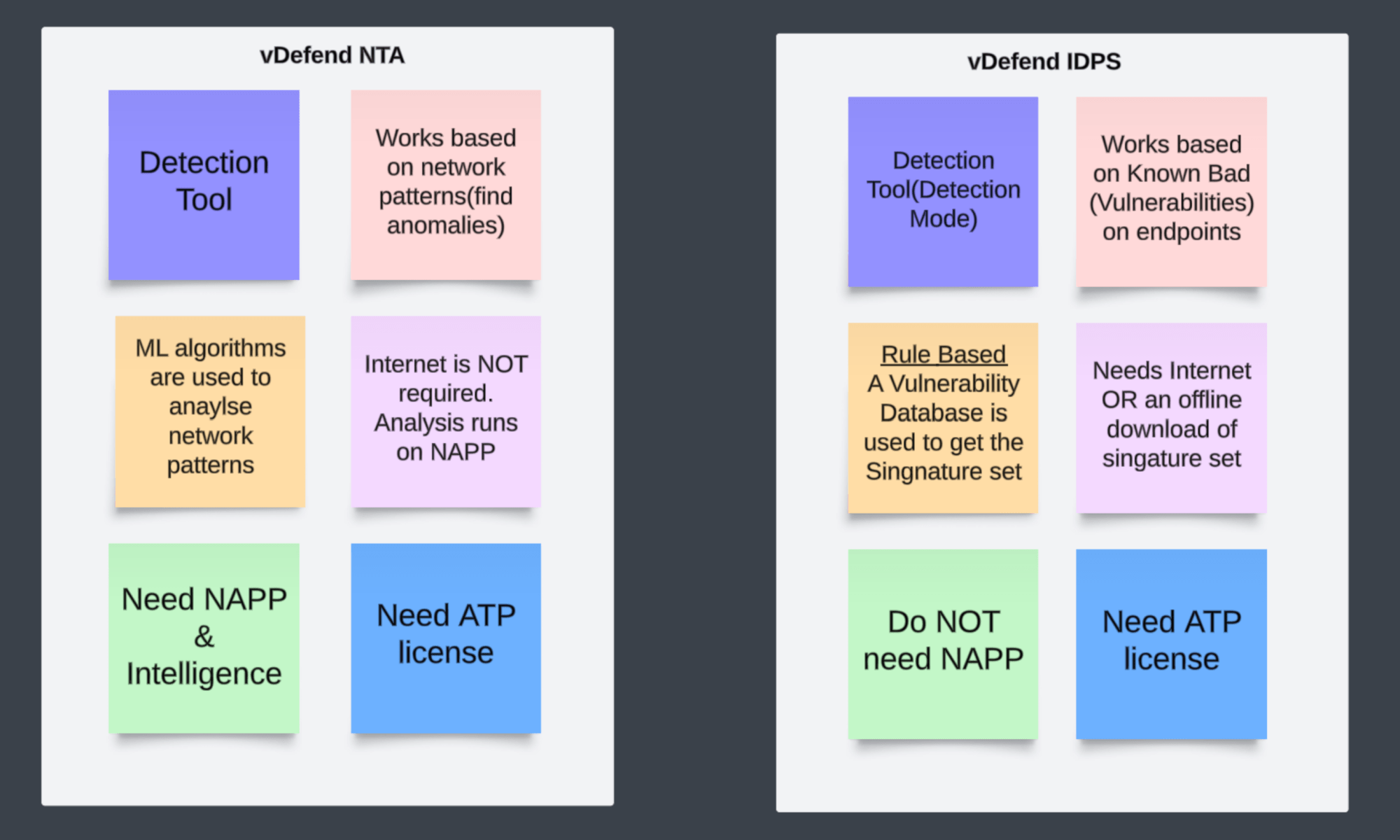
CuriousTechie: Is there any dependency between IDPS(Intrusion Detection and Prevention System) and NTA?

ITGuy: NO! Both NTA and IDS (Intrusion Detection System) are detection tools. But they work differently, and there is no dependency between vDefend NTA and IDS. Let me help you with some point about each of them.

CuriousTechie: This is very helpful! Can you point to me to some more resources for further reading and understanding of vDefend NTA.

ITGuy: Sure! You can check out the Official white papers here. If you are interested in learning with a Hands On approach then you can try this hands on lab “VMware vDefend Firewall with Advanced Threat Prevention HOL-2570-02-ANS-L” here

CuriousTechie: Thank you!

Unlocking Micro-Segmentation Potential with vDefend Security Intelligence

A discussion on vDefend Security Intelligence, also known as NSX Intelligence, for enhanced visibility within the Software-Defined Datacenter.

CuriousTechie: Hello IT Guy. In our last conversation here, we discussed micro-segmentation. Now, I have a solid understanding of how vDefend DFW can support it. However, I’m managing an existing brownfield environment with hundreds of applications and thousands of virtual machines. What’s the best approach to implement micro-segmentation in such a complex setup?

ITGuy: This is a very common scenario faced by every enterprise when they embark on their journey towards micro-segmentation. To sail through this journey you need two major things to consider as mentioned below.

  • A methodology
  • Tools
Continue reading “Unlocking Micro-Segmentation Potential with vDefend Security Intelligence”